kubectl-tenant plugin#
Tenant users work in ordinary kubectl. The problem is that Kubernetes gives them no way to see what they own.
Ask a developer to list the storage classes their tenant may use, or the namespaces it owns, and Kubernetes offers two answers, both wrong. Without cluster-scoped list permission they see nothing. With it they see everything on the cluster — every other tenant's namespaces included — because RBAC on a cluster-scoped resource is all-or-nothing. There is no "list the ones that are mine".
The kubectl-tenant plugin adds that missing verb.
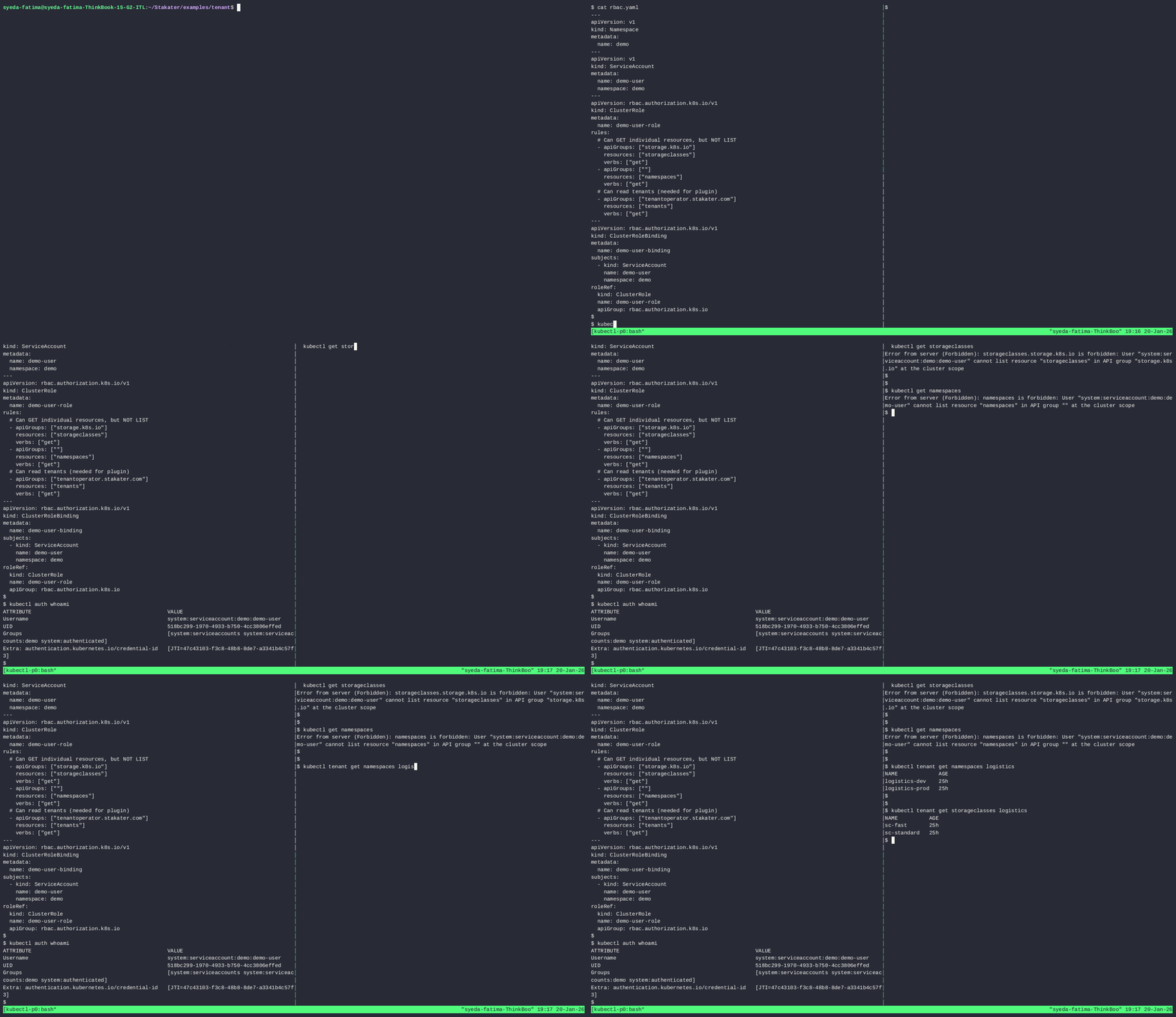
Source: kubectl-tenant on GitHub
Why It Matters#
For tenant users — the platform becomes discoverable from the command line they already use. kubectl tenant get namespaces my-tenant answers "what do I have?" without a console, a ticket, or a guess. Every standard output flag works, so it composes with the scripts and pipelines already in use.
For platform administrators — you no longer choose between a usable platform and a tight one. Tenant users get a scoped view without being granted cluster-wide read, which is the permission you did not want to hand out and the one that quietly turns a multi-tenant cluster into a transparent one.
Nothing in the request path. The plugin runs on the user's machine: it reads the Tenant resource, works out what that tenant is entitled to, and asks the API server for those objects. It is not a proxy. Other approaches to this problem place a component between users and the API server, which is another deployment to run, scale, secure and keep available — and which every kubectl call then depends on. Here, if the plugin is absent, kubectl behaves exactly as it always did.
Installation#
Releases are published as archives for Linux, macOS and Windows on amd64, arm64 and 32-bit architectures. Pick the one matching your machine from GitHub Releases:
VERSION=v1.0.0
OS=linux            # linux | darwin | windows
ARCH=amd64          # amd64 | arm64 | 386

curl -sL "https://github.com/stakater/kubectl-tenant/releases/download/${VERSION}/kubectl-tenant_${VERSION}_${OS}_${ARCH}.tar.gz" \
  | tar -xz kubectl-tenant
chmod +x kubectl-tenant
mv kubectl-tenant ~/.local/bin/   # ensure this path is in your $PATH
Each release also publishes a checksums file if you want to verify the download before installing.
kubectl discovers any executable named kubectl-* on your PATH and exposes it as a nested command, so no further configuration is needed. Verify it:
kubectl tenant --help
Build from Source#
git clone https://github.com/stakater/kubectl-tenant.git
cd kubectl-tenant
go build -o kubectl-tenant
mv kubectl-tenant /usr/local/bin/
Supported Resources#
These are the cluster-scoped resources a tenant has an entitlement to, so they are the ones where "show me mine" is a question Kubernetes cannot answer on its own.
| Resource | Command Keyword |
|---|---|
| Storage Classes | storageclasses |
| Namespaces | namespaces |
| Ingress Classes | ingressclasses |
| Priority Classes | priorityclasses |
| Quotas | quotas |
Resources that live inside a namespace are unaffected — ordinary kubectl already scopes those correctly through namespace RBAC.
Usage#
Command Syntax#
# List tenants for the current user
kubectl tenant list

# List all tenant-scoped resources
kubectl tenant get <resource-type> <tenant-name> [flags]

# Get a specific tenant-scoped resource
kubectl tenant get <resource-type> <tenant-name> <resource-name> [flags]
| Argument | Description |
|---|---|
resource-type |
The type of resource to list (storageclasses, namespaces, ingressclasses, priorityclasses, quotas) |
tenant-name |
The name of the Tenant CR to scope the query |
resource-name |
(Optional) Specific resource name to retrieve |
List Tenants#
Start here. It answers "which tenants am I in, and as what?" — useful when someone belongs to several, and the first thing to run after installing:
kubectl tenant list
NAME        ROLE
logistics   owner
warehouse   viewer
The role shown is the tenant role that grants the access — owner, editor or viewer — so a user can see immediately why a command succeeds or is refused.
List Resources#
List all storage classes for a tenant:
kubectl tenant get storageclasses my-tenant
NAME                  PROVISIONER             AGE
my-tenant-fast        kubernetes.io/aws-ebs   30d
my-tenant-standard    kubernetes.io/gp2       30d
List all namespaces for a tenant:
kubectl tenant get namespaces my-tenant
NAME                  AGE
my-tenant-prod        45d
my-tenant-staging     45d
my-tenant-dev         30d
Get Specific Resource#
Get a specific storage class:
kubectl tenant get storageclasses my-tenant my-tenant-fast
NAME                  PROVISIONER             AGE
my-tenant-fast        kubernetes.io/aws-ebs   30d
Output Formats#
All standard kubectl output formats and flags are supported, so the plugin composes with existing tooling rather than replacing it:
# YAML output
kubectl tenant get storageclasses my-tenant -o yaml

# JSON output
kubectl tenant get namespaces my-tenant -o json

# JSONPath for specific fields
kubectl tenant get namespaces my-tenant -o jsonpath='{.items[*].metadata.name}'

# Custom columns
kubectl tenant get namespaces my-tenant -o custom-columns=NAME:.metadata.name,STATUS:.status.phase
How It Works#
- Reads the specified Tenant resource from
tenantoperator.stakater.com/v1beta3. - Extracts the permitted resources from the tenant's status fields — the same status MTO's controllers maintain, so the answer reflects the live tenant definition rather than a cached copy.
- Requests those objects from the API server and prints them.
The user's own credentials are used throughout. The plugin narrows what is asked for; it does not widen what the user may have. Someone who is not a member of a tenant gets nothing from it.
Next#
- Tenant — the resource the plugin reads
- Console — the same information, for people who prefer a UI
- Storage Classes and Pod Priority Classes — how the entitlements it lists are configured