Giving an application a secret#
This is the path most people take, and everything else builds on it: annotate the workload, write a secret, read it from a pod. The examples use tenant team-a and its namespace team-a-api, created the ordinary way — see Creating a tenant. Nothing about the Tenant is OpenBao-specific.
1. Annotate the ServiceAccount#
The ServiceAccount is the identity OpenBao authenticates, so this is where access is granted. Name the engine you want, and the tier to grant it at:
apiVersion: v1
kind: ServiceAccount
metadata:
  name: web
  namespace: team-a-api
  annotations:
    bao.stakater.com/kv: "true"
    bao.stakater.com/tier: editor
tier is required alongside any engine — an engine annotation on its own grants nothing. For ServiceAccount web, this creates:
- an OpenBao policy scoped to that application's own path,
kv/data/dev/team-a-api/web/*; - a Kubernetes auth role, so the pod can trade its ServiceAccount token for a short-lived OpenBao token;
- a
ConfigMapnamedbao-config-webinteam-a-api, holding every address, role and path the workload needs.
The last path segment is the application, which defaults to the ServiceAccount name. Scoping to the application rather than the namespace is what stops two workloads in one namespace reading each other's secrets.
sequenceDiagram
    participant MTO as OpenBao extension
    participant K8s as Kubernetes
    participant Bao as OpenBao
    participant Pod
    MTO->>K8s: watch ServiceAccounts annotated bao.stakater.com/*
    MTO->>Bao: create the policy and login role for this ServiceAccount
    MTO->>K8s: write the bao-config-web ConfigMap beside the workload
    Pod->>Bao: log in with its ServiceAccount token
    Bao->>K8s: verify the token
    Bao-->>Pod: short-lived token carrying the application's policy
    Pod->>Bao: read and write under its own path
2. Write the first secret#
Someone has to write the first secret, which means knowing the path. The bao-apps ConfigMap answers that — every namespace with at least one OpenBao-enabled ServiceAccount has one, an entry per application:
$ kubectl get cm bao-apps -n team-a-api -o jsonpath='{.data.web}'
serviceAccount: "web"
tier: "editor"
engines: kv
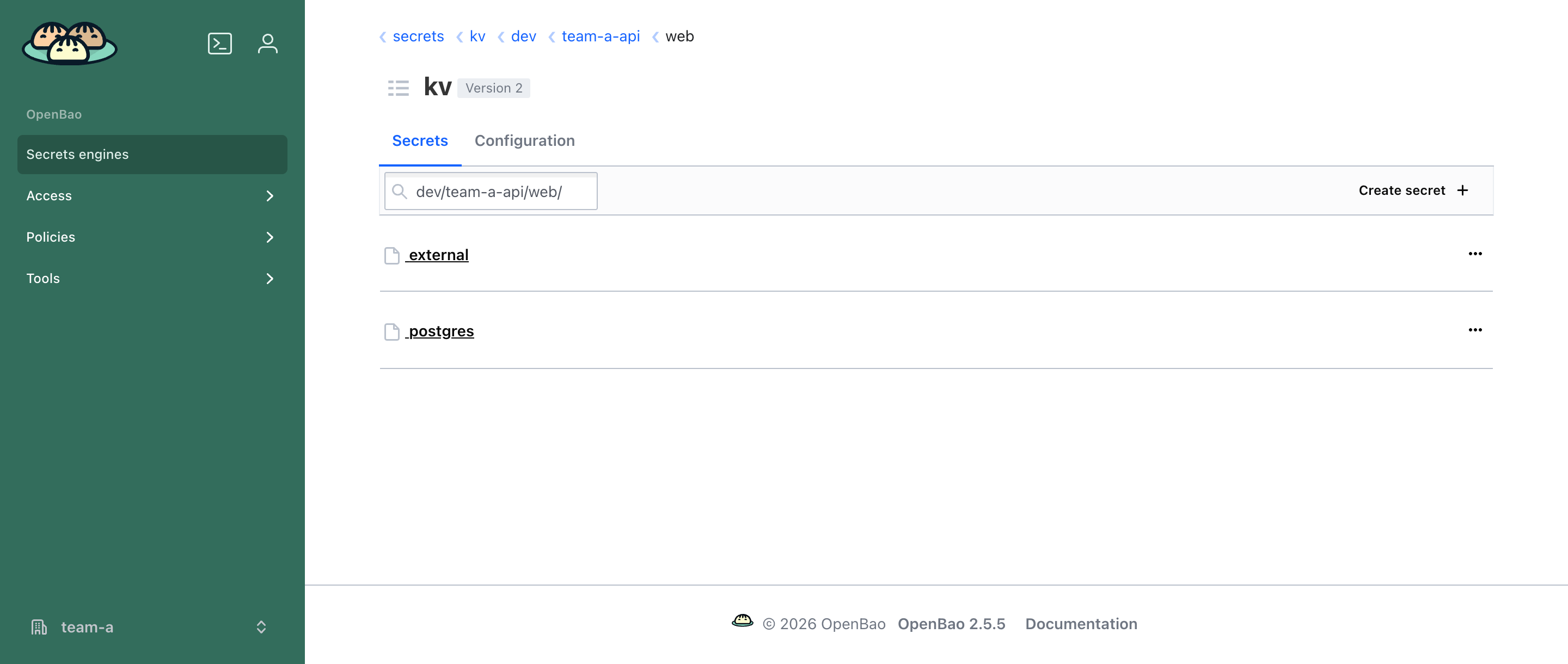
kvPath: kv/data/dev/team-a-api/web/
A person signed in through OIDC, or a pipeline with its own credentials, writes to that path:
bao login -method=oidc -namespace=team-a role=sso-team-a-admin
bao kv put -mount=kv dev/team-a-api/web/postgres username=app password=s3cr3t
In the OpenBao web UI, open the kv mount and browse dev/team-a-api/web/. The /data/ segment in kvPath is an API artefact and does not appear in the UI.
3. Read the secret from the pod#
Load the ConfigMap into the pod, and everything the workload needs is in its environment:
apiVersion: apps/v1
kind: Deployment
metadata:
  name: web
  namespace: team-a-api
spec:
  template:
    spec:
      serviceAccountName: web
      containers:
        - name: web
          image: my/web:1.0
          envFrom:
            - configMapRef:
                name: bao-config-web
export VAULT_TOKEN=$(bao write -field=token auth/kubernetes/login \
  role="${VAULT_K8S_ROLE}" \
  jwt=@/var/run/secrets/kubernetes.io/serviceaccount/token)

bao read "${VAULT_KV_APP_PATH}postgres"
The ConfigMap always carries the server address, the tenant's OpenBao namespace, the login role and the application's own paths:
| Key | Example | Meaning |
|---|---|---|
VAULT_ADDR |
https://openbao.openbao:8200 |
OpenBao server URL |
VAULT_NAMESPACE |
team-a/ |
the tenant's OpenBao namespace |
VAULT_K8S_ROLE |
team-a-team-a-api-web |
the login role for this ServiceAccount |
VAULT_KV_APP_PATH |
kv/data/dev/team-a-api/web/ |
where this application's secrets live |
VAULT_KV_SHARED_OUT_PATH |
kv/data/dev/_shared/from-team-a-api/ |
the namespace's shared folder |
Read these from the ConfigMap rather than copying them into manifests — they differ per tenant and application. Transit and PKI add their own keys when enabled.
Note
Every engine is reached the same way: one login with the ServiceAccount token, then the paths from the ConfigMap. Once you know it, transit and PKI need nothing new.
Prefer delivery over in-app calls#
Most applications should not call OpenBao at all — annotate the Deployment and the secret arrives as a Kubernetes Secret through External Secrets. See Delivery and login. Use the in-pod calls above only when an app genuinely needs the OpenBao API.
Previous: Installation · Next: Secrets and sharing